

Use caching
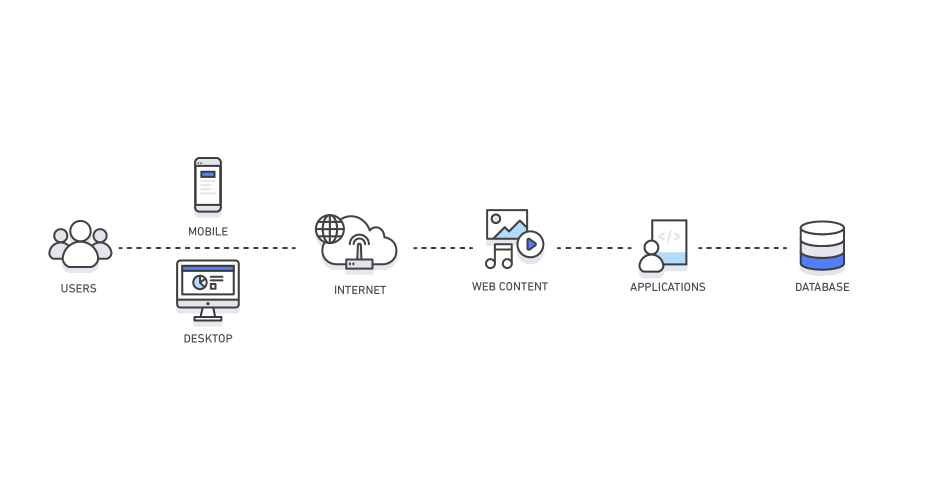
Caching is an essential technique to improve the performance of your Laravel application. By caching frequently accessed data, you can avoid unnecessary database queries and reduce the time required to generate a response. Laravel offers a flexible caching system that supports various drivers, including files, databases, and Memcached. Using caching can help your application handle a larger number of requests without sacrificing performance. Additionally, you can also leverage caching to store session data, route information, and configuration settings to further optimize your application’s performance.
Optimize your database queries
Optimizing database queries is critical to achieving optimal performance for your Laravel application. Poorly written database queries can cause slow response times and increase the load on your database server. Eloquent, Laravel’s built-in ORM, offers a powerful query builder that simplifies the process of writing complex queries. You can also use query scopes to encapsulate query logic, making your code more readable and maintainable. Indexing your database tables is another essential strategy for optimizing queries. By creating indexes on frequently accessed columns, you can speed up database queries and improve the overall performance of your application.
Use lazy loading
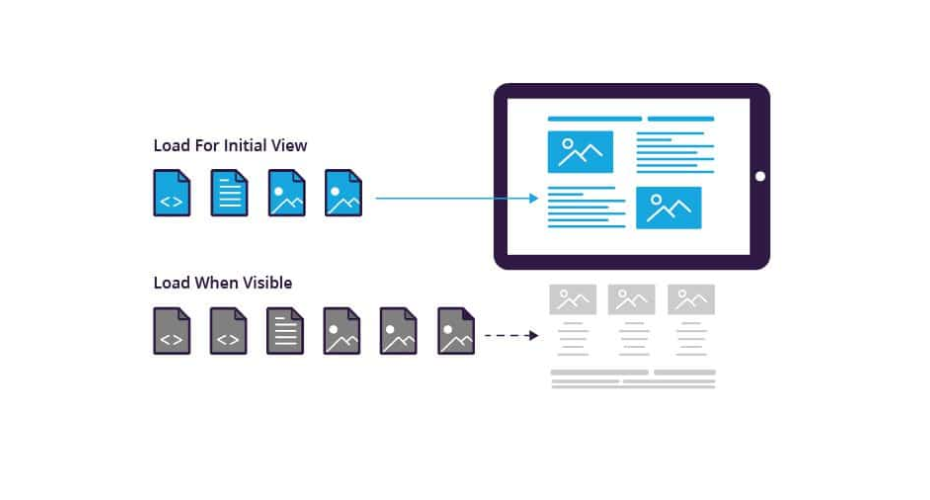
Laravel’s Eloquent ORM uses eager loading by default to retrieve related data. While this approach works well for small datasets, it can cause performance issues when dealing with larger datasets. To address this issue, you can use lazy loading, which loads related data only when it is needed. This approach can significantly reduce the number of database queries required to generate a response and improve the performance of your application. Additionally, you can also use the withCount() method to retrieve related data along with a count of related records, which can provide valuable insights for data analysis and decision-making.
Minimize external requests
External requests such as API calls and file downloads can significantly impact the performance of your Laravel application. When possible, you should minimize external requests to improve the speed and responsiveness of your application. One way to do this is by caching external data that doesn’t change frequently. Additionally, you can use asynchronous processing to handle time-consuming tasks such as sending emails, processing payments, or generating reports in the background without impacting the user experience.
Optimize your server configuration
Optimizing your server configuration is critical for achieving optimal performance for your Laravel application. You should make sure that your server is configured to handle the traffic and load of your application. This includes configuring the web server, PHP settings, and database server to ensure optimal performance. Additionally, you should monitor server performance regularly and use tools like New Relic or Blackfire to identify performance bottlenecks and resolve them quickly.
Use a Content Delivery Network (CDN)
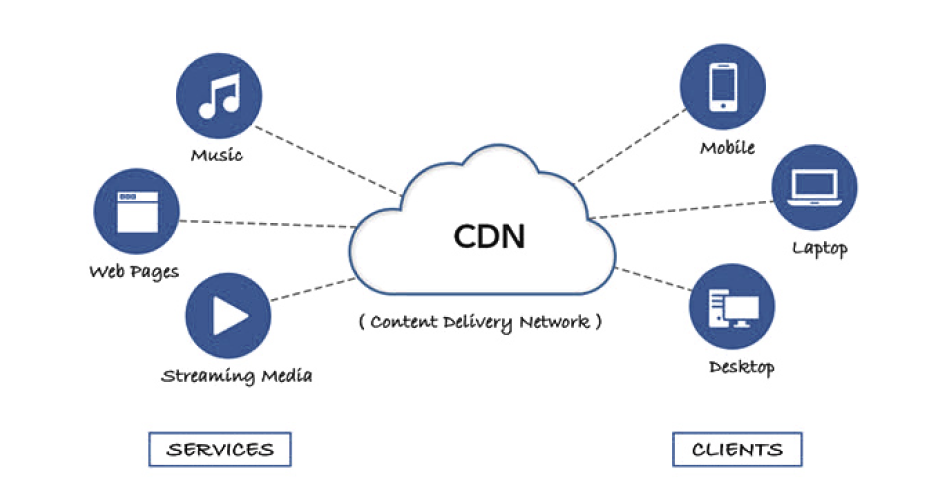
A Content Delivery Network (CDN) is a network of servers located around the world that cache and deliver content to users from the server closest to them. Using a CDN can significantly improve the performance of your Laravel application by reducing latency and improving the load times for static assets such as images, videos, and scripts. Cloudflare and Amazon CloudFront are popular CDNs that can be easily integrated with Laravel applications.
Use Queues
Queues are a powerful feature in Laravel that allows you to process time-consuming tasks in the background. By using queues, you can free up resources on your server and reduce the load on your database server. Laravel offers a simple and easy-to-use queue system that supports multiple drivers, including Redis, RabbitMQ, and Beanstalkd. You can use queues to handle tasks such as sending emails, processing payments, or generating reports without impacting the user experience.
Optimize your front-end assets
Optimizing your front-end assets such as CSS and JavaScript files is critical to achieving optimal performance for your Laravel application. You should minimize the number of requests and file sizes for your front-end assets to reduce the load time of your web pages. One way to do this is by combining and minifying your CSS and JavaScript files, which can significantly reduce the file size and improve the load time of your web pages. You can use tools like Laravel Mix or Grunt to automate this process and ensure that your front-end assets are optimized for performance.
Use Blade templates efficiently

The blade is Laravel’s templating engine that allows you to write clean and maintainable templates for your application’s views. Efficient use of Blade can significantly improve the performance of your Laravel application. One way to optimize Blade templates is by using template inheritance, which allows you to define a base template and reuse it across multiple views. You can also use Blade directives such as @foreach and @if to write more concise and readable templates. Additionally, you can cache your Blade views to reduce the time required to render them and improve the overall performance of your application.
Optimize your application's architecture
The architecture of your Laravel application can have a significant impact on its performance. A well-designed architecture can help you avoid performance bottlenecks and ensure that your application is scalable and maintainable. One way to optimize your application’s architecture is by using a modular design that separates your application into smaller, more manageable modules. This can help you isolate functionality and reduce the complexity of your codebase. Additionally, you can use design patterns such as the Repository pattern to encapsulate database logic and make your code more testable and maintainable.
Use pagination for large datasets
If your Laravel application deals with large datasets, using pagination can significantly improve its performance. Pagination allows you to split your data into smaller chunks and display them on different pages. This can help you reduce the load on your server and improve the response time of your application. Laravel’s built-in pagination system makes it easy to paginate data in your application’s views.
Optimize your code

Optimizing your code is critical to achieving optimal performance for your Laravel application. You should write clean, concise, and maintainable code that avoids unnecessary complexity and repetition. Additionally, you can use techniques such as code profiling to identify performance bottlenecks and optimize your code. Laravel offers several tools for profiling and optimizing your code, including Telescope and Tideways.
Use event-driven architecture
Event-driven architecture is a powerful approach to building Laravel applications that can significantly improve their performance. By using events, you can decouple your application’s components and improve its scalability and maintainability. Laravel’s built-in event system allows you to define and trigger events, which can be handled by event listeners. This can help you isolate functionality and reduce the complexity of your codebase.
Use middleware for authentication and authorization
Middleware is a powerful feature in Laravel that allows you to define the logic that runs before or after a request is processed. You can use middleware to handle authentication and authorization in your Laravel application, which can improve its security and performance. By using middleware, you can avoid unnecessary database queries and reduce the time required to generate a response. Additionally, you can use middleware to implement caching, logging, and other cross-cutting concerns in your application.
Use a load balancer
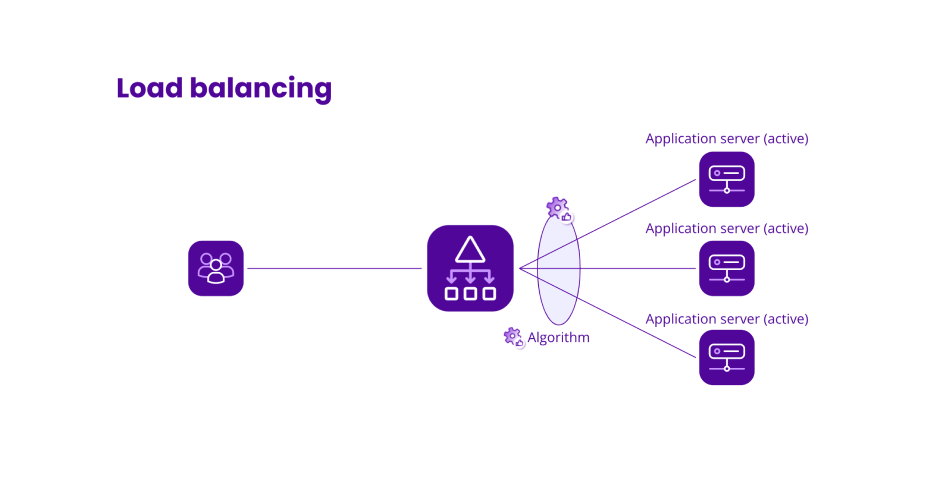
If your Laravel application handles a high volume of traffic, using a load balancer can help you distribute the load across multiple servers and improve its performance. A load balancer can monitor server health and distribute requests to the server with the lowest load, ensuring optimal performance and availability. Popular load balancers that can be used with Laravel applications include Nginx, Apache, and HAProxy.
Concluding
In conclusion, optimizing the performance of your Laravel application is crucial for providing a fast and responsive user experience. By using caching, optimizing your database queries, minimizing external requests, optimizing your server configuration, using a Content Delivery Network, using queues, and optimizing your front-end assets, you can significantly improve the performance of your Laravel application.

Don't want to miss anything?
Get weekly updates on the newest design stories, case studies and tips right in your mailbox.
