

Understanding the Fundamentals
Before diving into integration, it’s essential to grasp the fundamentals of Vue.js, Angular, and React. Familiarize yourself with their core concepts, syntax, and project structures. Understanding the similarities and differences between these frameworks will help you make informed decisions during the integration process.
- Vue.js Fundamentals: Get familiar with Vue.js directives, components, and the Vue instance. Understand the Vue component lifecycle and how to handle data and methods within Vue components. Learn about Vue Router for handling client-side routing and Vuex for state management.
- Angular Fundamentals: Dive into Angular’s component-based architecture, decorators, and dependency injection. Explore Angular modules, services, and directives. Gain an understanding of Angular’s routing system using Angular Router and its built-in state management tool, NgRx.
- React Fundamentals: Learn about React’s JSX syntax, functional and class components, and React hooks for managing state and lifecycle. Understand React Router for handling navigation and popular state management libraries like Redux and React Context.
Vue.js with Angular
Integrating Vue.js with Angular allows you to combine the simplicity and reactivity of Vue.js with the robustness and structure of Angular. One approach is to use Vue.js components within an Angular application. This can be achieved by leveraging Angular’s custom elements or using a library like vue-custom-element. By encapsulating Vue.js components and utilizing them seamlessly within an Angular project, you can enhance the user experience and leverage the strengths of both frameworks.
- Custom Elements: Explore Angular’s support for custom elements and Vue.js’s ability to compile components into custom elements. Learn how to register Vue.js components as Angular custom elements, enabling you to use Vue.js components directly in your Angular templates.
- vue-custom-element Library: Dive into the vue-custom-element library, which provides a bridge between Vue.js and Angular. Learn how to create Angular directives for Vue.js components, making it easy to use Vue.js components as Angular directives within your Angular application.
- Sharing Data: Understand how to pass data between Vue.js components and Angular components. Explore techniques like props, events, or using a shared service to enable seamless communication and data synchronization between the integrated components.
Vue.js with React

Combining Vue.js with React opens up opportunities to mix and match components, taking advantage of each framework’s unique features. One approach is to use Vue.js components within a React project. You can accomplish this by using libraries like react-vue or vue-next. These libraries enable you to render Vue.js components as React components, allowing for seamless integration and reusability across projects.
- react-vue Library: Explore the react-vue library, which enables the use of Vue.js components within a React project. Learn how to import and render Vue.js components in your React application, leveraging the power and flexibility of Vue.js alongside React’s ecosystem.
- vue-next Library: Dive into the vue-next library, which provides compatibility between Vue.js 3 and React. Understand how to leverage Vue.js 3’s Composition API to create reusable and reactive components that can be seamlessly integrated into your React project.
- State Management: Explore how to handle state management when integrating Vue.js with React. Consider using libraries like Redux or React Context to manage shared states between Vue.js and React components, ensuring consistent and synchronized data flow throughout your application.
Sharing State and Data
One of the challenges in integration is sharing state and data between frameworks. When integrating Vue.js with Angular or React, you can utilize various state management solutions like Vuex (for Vue.js), NgRx (for Angular), or Redux (for React). These state management libraries provide a centralized store for managing application states, enabling components from different frameworks to access and update shared data seamlessly.
- Vuex: Learn how to set up a Vuex store in Vue.js and leverage its features like state, mutations, actions, and getters. Understand how to integrate the Vuex store with Angular or React components to achieve consistent state management across the application.
- NgRx: Explore NgRx, the state management library for Angular, and understand its concepts such as actions, reducers, effects, and selectors. Learn how to integrate NgRx with Vue.js and React components to share and manage state effectively.
- Redux: Dive into Redux, the widely-used state management library for React. Gain knowledge on setting up a Redux store, defining actions and reducers, and connecting Vue.js and Angular components to the Redux store to achieve seamless data sharing and synchronization.
Routing and Navigation
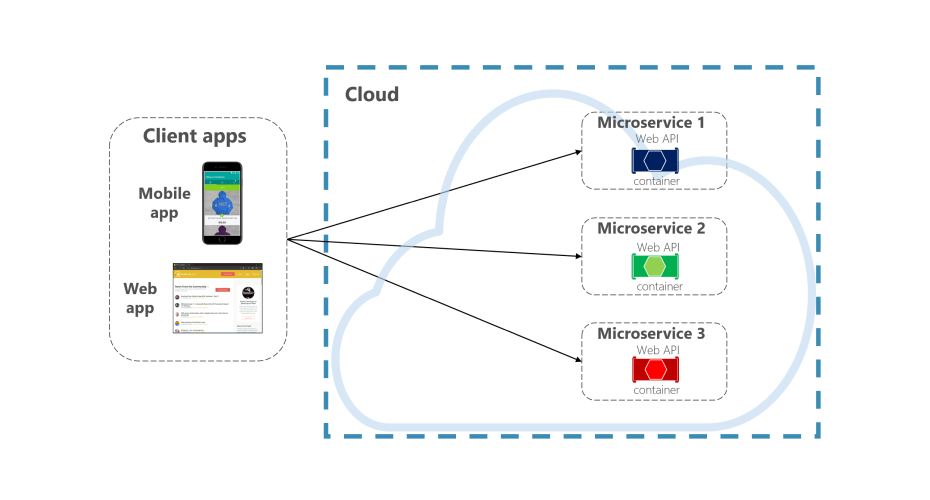
Integrating routing and navigation is crucial for building complex applications. Vue Router, Angular Router, and React Router are powerful libraries that can be integrated to handle routing needs. You can utilize these libraries alongside the respective framework to create a cohesive navigation experience. Consider using an abstraction layer like single-spa, which allows you to build micro-frontends using different frameworks and seamlessly switch between them.
- Vue Router: Learn how to set up Vue Router to handle routing in a Vue.js application. Understand how to define routes, navigate between views, and integrate Vue Router with Angular or React for seamless navigation in integrated projects.
- Angular Router: Explore Angular Router and its features like route configuration, route guards, and lazy loading. Discover how to integrate Angular Router with Vue.js or React, allowing for smooth navigation and consistent URL handling in hybrid applications.
- React Router: Dive into React Router and understand its declarative routing approach using components. Learn how to define routes, handle navigation events, and integrate React Router with Vue.js or Angular for unified routing experiences in integrated projects.
Styling and UI Libraries
When integrating Vue.js with Angular or React, you can leverage existing styling and UI libraries from each framework. For instance, you can use Angular Material or PrimeNG in an Angular project, while utilizing Material-UI or Ant Design in a React project. Vue.js can adopt these libraries using Vue Material or Vuetify. This approach ensures consistent styling and UI components across your integrated application.
- Angular Styling: Explore popular Angular stylings solutions like CSS, SASS, or SCSS. Understand how to integrate CSS frameworks and UI libraries like Angular Material or PrimeNG to enhance the visual appeal and user experience of your integrated application.
- React Styling: Learn about different styling options in React, such as inline styles, CSS modules, or CSS-in-JS libraries like styled components or Emotion. Discover how to integrate UI libraries like Material-UI or Ant Design to create visually stunning components in your integrated React project.
- Vue.js Styling: Explore Vue.js styling options like inline styles, CSS modules, or scoped styles. Discover how to integrate UI libraries like Vue Material or Vuetify to enhance the aesthetics and user interface of your integrated Vue.js application.
Testing and Maintenance

Ensure proper testing and maintenance practices when integrating Vue.js with other frameworks. Write unit tests using testing frameworks like Jasmine, Jest, or Karma to verify the functionality of integrated components. Establish a robust testing strategy to cover all integration points and handle potential compatibility issues. Regularly update dependencies and keep an eye on the compatibility matrix of the frameworks and libraries used.
- Unit Testing: Understand the importance of unit testing when integrating Vue.js with Angular or React. Set up test environments, write test cases, and perform component-level testing to ensure the functionality and compatibility of integrated components.
- Maintenance Best Practices: Implement version control and utilize package managers like npm or yarn to manage dependencies effectively. Stay updated with the latest releases and bug fixes for Vue.js, Angular, and React frameworks. Follow coding standards and documentation practices to ensure maintainability and ease of future updates.
RIVO AGENCY: Your Vue.js Development Experts
Choose RIVO AGENCY for exceptional Vue.js development. Our team of Vue.js specialists delivers customized solutions tailored to your business needs. With deep expertise in the Vue.js ecosystem, seamless integration capabilities, and attention to detail, we ensure top-notch quality and timely delivery. Collaborate with us to elevate your Vue.js projects to new heights. Contact RIVO AGENCY today for expert Vue.js development services.
Concluding
Integrating Vue.js with other front-end frameworks like Angular and React unlocks a new level of flexibility and scalability for your web development projects. By understanding the fundamentals, leveraging shared state management, handling routing and navigation, and utilizing existing styling and UI libraries, you can seamlessly integrate these frameworks to create powerful, feature-rich applications. Embrace the best practices, stay updated with the latest releases, and experiment with different integration techniques to find the perfect balance between Vue.js, Angular, and React in your development workflow.

Don't want to miss anything?
Get weekly updates on the newest design stories, case studies and tips right in your mailbox.
